
How Much Is Resume Builder? Free vs Paid Explained
Most resume builders cost $0 to $30 a month. See what free plans include, what premium unlocks, and when paying is worth it. Learn.
 Published by Pika Resume Team|July 26, 2026|11 min read
How Much Is Resume Builder? Free vs Paid Explained
A resume builder is often free to start, but the version that actually gets you a usable PDF usually costs something. As of July 2026, the common range is $0 for basic drafting, about $5 to $30 per month for premium access, and sometimes a one-time fee for limited lifetime use.
Key takeaways
- Most people can start in a free resume builder, but exports, templates, and AI tools are where payment usually appears.
- If you only need one clean resume, a free plan may be enough, especially if it includes a real PDF download.
- If you need multiple versions, stronger formatting control, or AI rewrites, a paid plan usually pays for itself in time.
- The headline price matters less than the export rules, download limits, and cancellation terms.
- A good comparison is not “free versus paid” in theory, but what you can actually send to an employer today.
How much is resume builder?
How much is resume builder usually depends on which part of the workflow is locked. A basic account is often free, premium plans commonly sit around $5 to $30 per month, and some tools offer annual billing or a one-time purchase for narrower access. The real question is not the sticker price, but whether you can export, edit, and reuse the file without hitting a paywall.
A lot of builders advertise free entry and then charge for the part that matters most: a clean download. Others keep the editor free but limit templates, remove branding only on paid plans, or cap the number of resumes you can create. If you want current plan details, Pikaresume pricing is the place to check the live tiers rather than guessing from a landing page.
The simplest way to think about pricing is this: free gets you a draft, paid gets you convenience and control. That line is what separates a casual trial from a tool you can use for an active job search. For a plain explanation of what builders do before pricing enters the picture, see what builders do for job seekers.
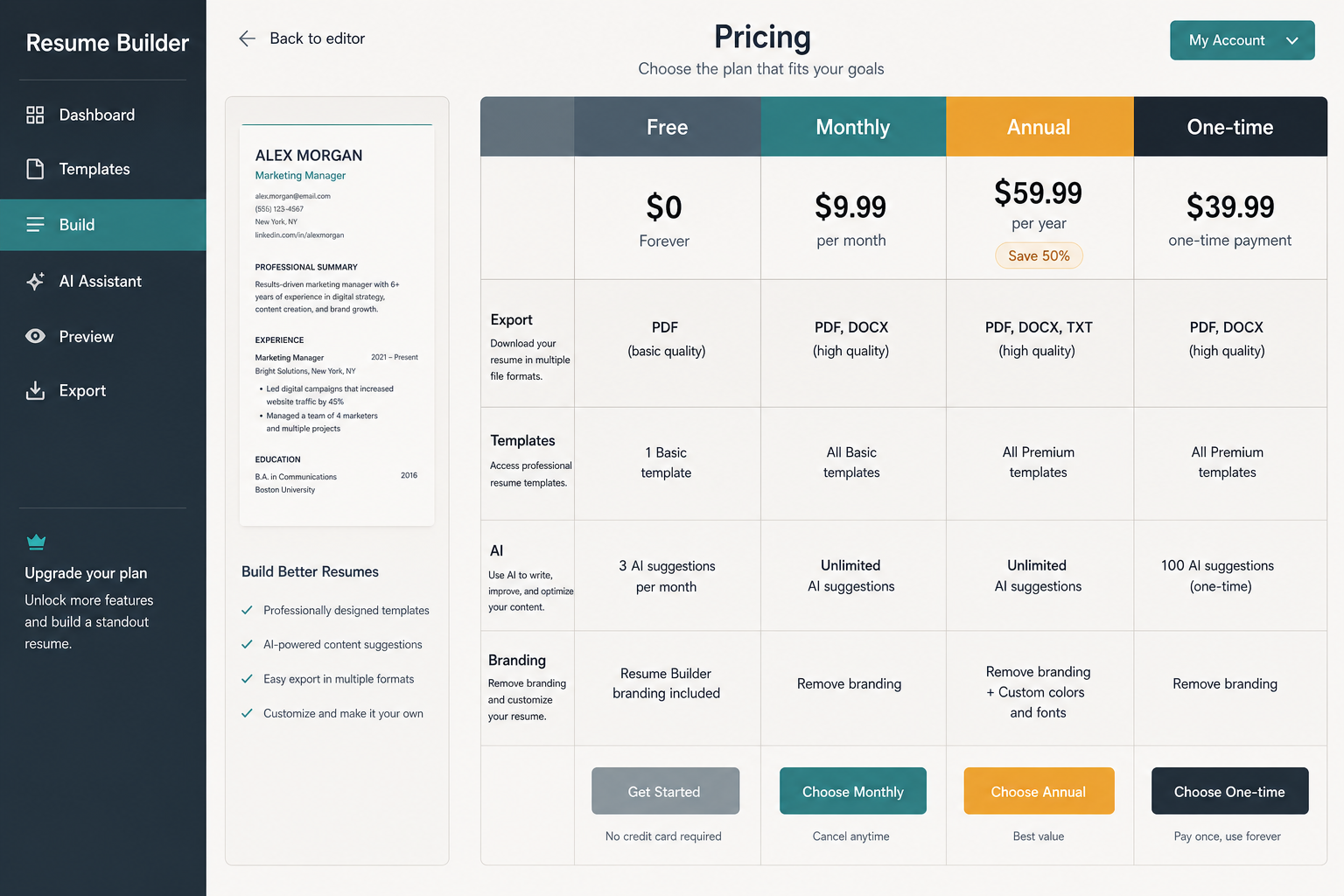
Compare the full feature set, not just the headline price.
Note: A builder that says “free” can still charge for PDF export, full template access, or watermark removal. Read the export rules before you build around the tool.
What free resume builders usually include
Free resume builders usually cover the basics: a starter template, editable sections, simple formatting help, and a preview you can save or export in limited form. If someone searches for a free resume builder, create resume online free, or free resume builder and download, this is usually what they are hoping to find.
Typical free-plan inclusions look like this:
- One or a small number of resume templates
- Basic text editing and section rearranging
- Spellcheck or simple AI prompts in some tools
- A preview mode before payment
- A limited PDF download, or no-download access until upgrade
The trade-off is usually restriction, not cancellation. You may see ads, branding, fewer fonts, locked design choices, or a cap on how many resumes you can make. If you want a deeper look at the limits that matter most, free resume builder limits are worth checking before you spend an hour building on a dead-end plan.
Some free tools are genuinely usable, especially if you only need one clean version for a straightforward role. Others are more like a demo: enough to prove the product works, not enough to finish the job. If the free plan does not let you download a usable file, the cost is not $0, it is your time.
What paid resume builder plans are actually buying
Paid resume builder plans usually buy speed, export freedom, and fewer formatting headaches. The upgrade often unlocks more templates, unlimited downloads, better PDF control, and the ability to keep multiple versions for different jobs.
That matters because job searching is rarely one-and-done. A recent graduate, a career changer, and a senior candidate all need different layouts, different phrasing, and sometimes different versions for different roles. Premium plans usually make that easier by removing friction from editing and duplication. They also tend to include ATS-friendly formatting, which is one of the main reasons people pay instead of trying to force the same result in a generic document editor.
The AI feature gap is another big divider. A free AI resume builder may give you a few prompts or a small number of suggestions, while a paid resume builder ai plan is more likely to offer rewrite tools, tailored bullet generation, or multiple passes over the same resume. If that is the part you are comparing, free AI resume builder limits are the right lens.
This is where premium plans can look expensive on paper but cheap in practice. If a subscription saves two hours of formatting and gives you a cleaner PDF you can reuse across applications, the monthly cost may be easier to justify than it first appears. For current pricing, the live premium plan details show what is bundled at each level.
Is it worth paying for a resume builder?
It is worth paying when the builder saves time, gives you better exports, or removes a limit that blocks real applications. If the free version leaves watermarks, limits downloads, or makes formatting fragile, the paid plan is buying you usability, not just features.
For occasional job seekers, a free plan can be enough. If you are applying to a handful of roles and only need one clean resume, you may not need a subscription at all. But if you are tailoring resumes for multiple openings, changing summaries often, or building separate versions for different industries, the paid route becomes easier to defend.
There is also a practical comparison with tools people already know. Microsoft Word gives you full control, but you have to do the layout work yourself. Adobe Acrobat is useful once you already have a PDF, but it is not the simplest way to create a polished resume from scratch. Jobscan is strong when the priority is matching a job description, but it is not a layout-first builder. A resume builder earns its fee when you want structure and speed in the same place.
Canva sits in the middle for many users. It is attractive and flexible, and the Canva comparison is helpful if you care about design as much as content. The catch is that design-first tools can feel easy while still making ATS-safe formatting harder than it needs to be.
How to compare resume builder prices without getting fooled by the headline
Compare the full cost, not just the monthly number. A low headline price can hide trial limits, export fees, annual-only billing, or cancellation rules that make the first month misleading.
A practical checklist helps:
- Check whether PDF download is free or paid.
- Check whether the builder charges monthly, annually, or once.
- Check how many templates and resumes are included.
- Check whether AI suggestions are part of the base plan.
- Check whether watermarks or branding disappear only after upgrade.
- Check cancellation terms before entering payment details.
That checklist matters because the cheapest plan is not always the cheapest outcome. If a builder makes you pay to export, then free is only a preview. If it locks customization behind a higher tier, then the time you spend rebuilding the resume can cost more than the subscription itself.
When readers compare a resume maker, a resume builder app, or an online resume maker free pdf option, they are usually comparing convenience more than raw price. Jobscan-style optimization tools also change the equation, because the value is not the template, it is the match rate and the guidance. That makes the comparison less about “what is cheapest” and more about “what do I need this week.”
How much do resume builders cost across common use cases?
Resume builder costs usually track the type of job search, not just the number of features. A casual user may spend nothing, a frequent applicant may pay a modest monthly fee, and a heavy user may prefer annual billing if they expect to keep editing over several months.
| Use case | Typical cost | What you usually get | When it makes sense |
|---|---|---|---|
| One-time resume | $0 to $10 | Basic template, limited export, simple editing | You need one clean file and do not plan to revise it often |
| Active job search | $5 to $30 per month | More templates, unlimited downloads, better formatting control | You are applying to many roles and tailoring often |
| AI-heavy workflow | $10 to $30 per month, sometimes more | Rewrites, bullet suggestions, multiple versions | You want faster drafting and less manual editing |
| Design-first workflow | Often free to low-cost | Strong visuals, lighter structure control | You care more about presentation than deep optimization |
| Long-term use | Annual plan or one-time access | Lower effective monthly price | You will keep updating the same resume over time |
If you are comparing a free resume builder to a premium plan, the real decision is usually how often you will reuse it. One resume for one application is one economics problem. Ten tailored versions for ten jobs is a different one.
That is also why phrases like best free resume builder or best resume builder free do not tell the whole story. The best plan for a student sending out two applications is not the best plan for a marketer sending out twenty. A resume builder app can be cheap, but if it slows you down every time you export, the low price stops mattering.
Is there a 100% free resume builder?
Yes, some resume builders are 100% free for basic resume creation, but the free tier usually comes with limits. The difference is between free creation, free preview, and free final download, and those are not the same thing.
A true free builder lets you build the resume and take the file with you. A softer version lets you design the resume but charges when you download PDF, remove branding, or unlock better templates. The distinction is why searches like free resume builder and download matter so much in practice.
Canva is often mentioned in this conversation because its entry point feels free and flexible, but the real question is whether the export and formatting fit your target role. The same is true of many free AI resume builder products: the editor may be free, while the useful export or rewrite tools are not.
So, yes, there are truly free options. But the more honest answer is that “free” usually means “free with conditions.” If you want a shortlist of what to look for in a genuinely usable free tier, the guide on free resume builder limits is the fastest way to sanity-check the offer.
What is a good resume builder?
A good resume builder is one that lets the user produce a clean, editable, exportable resume without fighting the layout. The best ones balance simplicity, ATS-friendly formatting, and enough customization to match the job.
That usually means three things. First, the builder should keep formatting stable when text changes. Second, it should export a proper PDF without hidden surprises. Third, it should make it easy to create more than one version if the job search becomes more active. For readers who care about structure as much as style, the ATS-friendly formatting guide is a useful companion.
A good free resume builder is not always the one with the most templates. It is the one that gets the candidate to a usable file with the least friction. That can be more important than flashy design, especially for people applying through employer systems that care more about clean parsing than visual flair.
The best free resume builder for one person may be wrong for another. A student, a career changer, and an experienced manager do not need the same workflow. The right choice is the one that matches the level of control, export quality, and speed the user actually needs.
Frequently asked questions
Is resume builder actually free?
Yes, many resume builders are free to start, but the useful parts are often paywalled. A free tier may cover drafting and previewing, while PDF download, premium templates, or AI features require payment.
What is the best free resume builder?
The best free resume builder is the one that gives a real downloadable file, stable formatting, and enough template choice for the job. If a tool only offers a preview, or adds branding to the output, it is free in the narrowest sense, not the most useful one.


Create your Resume
Your resume is an extension of you. Make it truly yours.
Related Articles
Related guides & tools
Continue Reading
Check more recommended readings to get the job of your dreams.
careerBy Pika Resume Team | Aug 3, 2026
Resume Maker vs Resume Builder: Which Should Job Seekers Use?
By Pika Resume Team | Aug 3, 2026
careerBy Pika Resume Team | Aug 2, 2026
Free Resume Builder and Download vs Microsoft Word
By Pika Resume Team | Aug 2, 2026
careerBy Pika Resume Team | Jul 30, 2026
What Is the Best Resume Builder Website for 2026?
By Pika Resume Team | Jul 30, 2026
careerBy Pika Resume Team | Jul 27, 2026
How to Cancel Resume Builder Subscription Without Surprises
By Pika Resume Team | Jul 27, 2026
careerBy Pika Resume Team | Jul 26, 2026
How Much Is Resume Builder? Free vs Paid Explained
By Pika Resume Team | Jul 26, 2026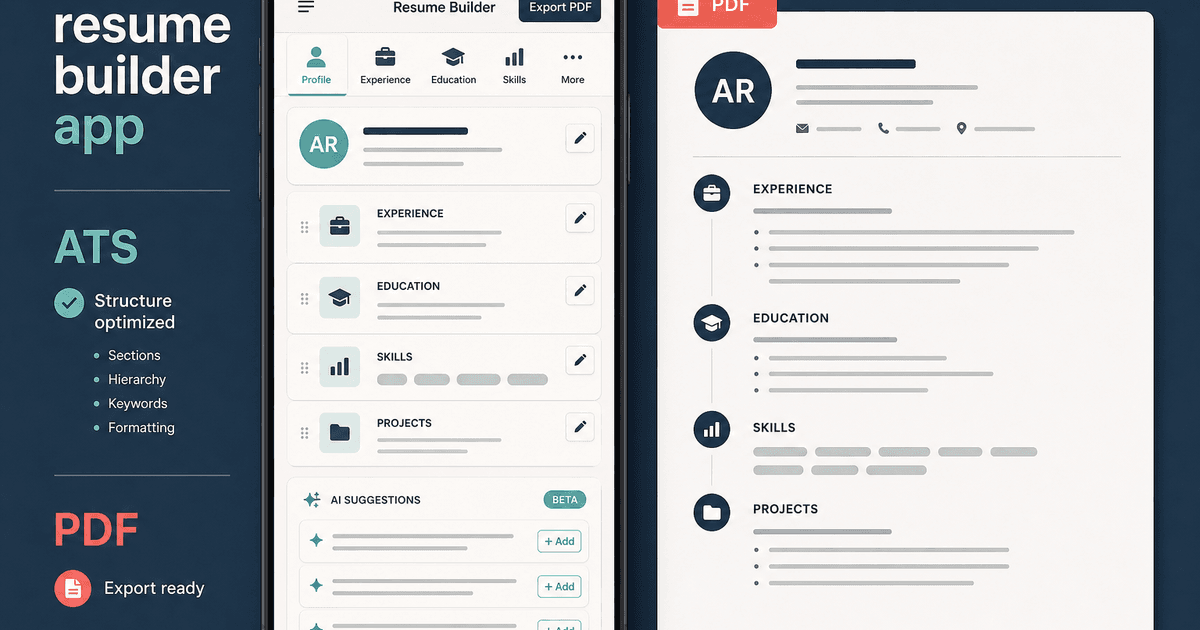
careerBy Pika Resume Team | Jul 20, 2026
Resume Builder App: What the Best One Lets You Do
By Pika Resume Team | Jul 20, 2026
careerBy Pika Resume Team | Jul 19, 2026
Free Resume Builder and Download: Compare the Best Options
By Pika Resume Team | Jul 19, 2026
careerBy Pika Resume Team | Jul 16, 2026
Free AI Resume Builder: What It Does Well and Fails At
By Pika Resume Team | Jul 16, 2026
careerBy Pika Resume Team | Jul 13, 2026
Resume format for ATS: a simple guide that works
By Pika Resume Team | Jul 13, 2026
careerBy Pika Resume Team | Jul 12, 2026
Canva Resume Builder vs ATS Reality Check
By Pika Resume Team | Jul 12, 2026
careerBy Pika Resume Team | Jul 9, 2026
Free resume builder: what makes one worth using
By Pika Resume Team | Jul 9, 2026
careerBy Pika Resume Team | Jul 6, 2026
Resume Builder: What It Actually Does for Job Seekers
By Pika Resume Team | Jul 6, 2026
resume tipsBy Pika Resume Team | Jun 20, 2026
The Resume Sections Most People Get Wrong (and How to Fix Each One)
By Pika Resume Team | Jun 20, 2026resume tipsBy Pika Resume Team | Jun 18, 2026
How to Edit a PDF Resume Without Wrecking the Formatting
By Pika Resume Team | Jun 18, 2026resume reviewBy Pika Resume Team | Jun 16, 2026
AI Resume Feedback vs a Human Expert Review: When Each Is Worth It
By Pika Resume Team | Jun 16, 2026atsBy Pika Resume Team | Jun 14, 2026
What an ATS Actually Does to Your Resume (and the 8 Things It Scores)
By Pika Resume Team | Jun 14, 2026resume tipsBy Pika Resume Team | Jun 12, 2026
How to Tailor Your Resume to a Job Description in 2026 (the 3-Pass Method)
By Pika Resume Team | Jun 12, 2026resumeBy Gargi Chaudhari | May 30, 2026
Resume vs Biodata vs CV: Which One Do You Actually Need?
By Gargi Chaudhari | May 30, 2026resume By Astha Narang | May 28, 2026
10 Software Engineer Resume Examples That Got Interviews (2026)
By Astha Narang | May 28, 2026resumeBy Gargi Chaudhari | May 26, 2026
How to Convert a LinkedIn Profile to a Resume or CV
By Gargi Chaudhari | May 26, 2026resumeBy Astha Narang | May 23, 2026
Best Resume Format for Indian IT Services Companies (TCS, Infosys, Wipro, Accenture)
By Astha Narang | May 23, 2026resumeBy Gargi Chaudhari | May 21, 2026
The Complete Guide to ATS Resume Screening in India (2026)
By Gargi Chaudhari | May 21, 2026resumeBy Astha Narang | May 19, 2026
Hobbies and Interests for Resume: Should You Include Them?
By Astha Narang | May 19, 2026resumeBy Gargi Chaudhari | May 14, 2026
How to Write a Resume Headline That Gets Recruiter Calls on Naukri
By Gargi Chaudhari | May 14, 2026interviewBy Astha Narang | May 8, 2026
Decoding Interviewer Psychology: What They Don't Tell You for Your Next Job
By Astha Narang | May 8, 2026resumeBy Gargi Chaudhari | May 7, 2026
Career Objective for Resume: 50+ Fresher Examples (2026)
By Gargi Chaudhari | May 7, 2026resumeBy Astha Narang | May 6, 2026
7 Dangerous ATS Myths Debunked: What Actually Gets You Hired in 2026
By Astha Narang | May 6, 2026resumeBy Astha Narang | May 4, 2026
Master Your Resume: The Ultimate Guide to Listing Computer Skills
By Astha Narang | May 4, 2026resumeBy Astha Narang | Apr 29, 2026
4 Sales Resume Examples for SDR, Account Executive & Manager (2026)
By Astha Narang | Apr 29, 2026resumeBy Astha Narang | Apr 29, 2026
4 Data Analyst Resume Examples for 2026 (Entry-Level to Senior)
By Astha Narang | Apr 29, 2026resumeBy Astha Narang | Apr 24, 2026
Resume Tips for 2026: The Ultimate Guide to Landing Interviews
By Astha Narang | Apr 24, 2026resumeBy Astha Narang | Apr 22, 2026
Bad Resume vs. Good Resume: A Side-by-Side Comparison for Job Seekers
By Astha Narang | Apr 22, 2026resumeBy Astha Narang | Apr 20, 2026
How to Add LinkedIn to Your Resume the Right Way in 2026
By Astha Narang | Apr 20, 2026resumeBy Astha Narang | Apr 17, 2026
7 Common Resume Mistakes to Avoid in 2026 (and How to Fix Them)
By Astha Narang | Apr 17, 2026resumeBy Pika Resume Team | Apr 15, 2026
Master Your LinkedIn-to-Resume Link: A 2026 Guide for Top Candidates
By Pika Resume Team | Apr 15, 2026resumeBy Astha Narang | Apr 13, 2026
How to Write a Winning Resume Summary That Grabs Recruiter Attention
By Astha Narang | Apr 13, 2026careerBy Astha Narang | Apr 11, 2026
Owning Your Career Break: How to Frame a Gap Year on Your Resume in 2026
By Astha Narang | Apr 11, 2026resumeBy Astha Narang | Apr 8, 2026
The Complete 2026 Resume Guide: Crafting a Job-Winning Document
By Astha Narang | Apr 8, 2026resumeBy Astha Narang | Apr 4, 2026
Beat the ATS: Optimize Your Resume for Applicant Tracking Systems in 2026
By Astha Narang | Apr 4, 2026resumeBy Astha Narang | Mar 30, 2026
Expert Resume Review: Is It Worth the Investment for Your Career?
By Astha Narang | Mar 30, 2026resumeBy Astha Narang | Mar 25, 2026
Master the 30-Second Resume Scan: Expert & Recruiter Insights
By Astha Narang | Mar 25, 2026resumeBy Astha Narang | Mar 24, 2026
How to Explain Employment Gaps on Your Resume & Ace Interviews
By Astha Narang | Mar 24, 2026resumeBy Astha Narang | Mar 20, 2026
Master Resume Keywords: Your Guide to ATS Success
By Astha Narang | Mar 20, 2026careerBy Astha Narang | Mar 18, 2026
How to Stand Out in Interviews While Still Being Authentic
By Astha Narang | Mar 18, 2026careerBy Astha Narang | Mar 14, 2026
Why Sending the Same Resume to Every Job is Costing You Interviews
By Astha Narang | Mar 14, 2026resumeBy Astha Narang | Mar 12, 2026
The Dynamic Duo: Why AI + Human Expertise is the 2026 Career Cheat Code
By Astha Narang | Mar 12, 2026careerBy Astha Narang | Mar 9, 2026
Get Your Resume Roasted Using PIKA AI
By Astha Narang | Mar 9, 2026jobBy Astha Narang | Mar 7, 2026
How to Show a Promotion on Your Resume? (And Why Most People Get It Wrong)
By Astha Narang | Mar 7, 2026careerBy Astha Narang | Mar 6, 2026
Should You Put Your Address on Your Resume in 2026?
By Astha Narang | Mar 6, 2026careerBy Astha Narang | Mar 3, 2026
Is It Illegal to Lie on a Resume? What Actually Happens in 2026
By Astha Narang | Mar 3, 2026jobBy Pika Resume Team | Feb 5, 2026
How to Optimize Your Resume for Remote Job Applications
By Pika Resume Team | Feb 5, 2026interviewBy Pika Resume Team | Feb 1, 2026
How to Write an ATS-Friendly Resume in 2026
By Pika Resume Team | Feb 1, 2026cover-letterBy Pika Resume Team | Jan 25, 2026
Top 7 Cover Letter Mistakes That Cost You the Interview
By Pika Resume Team | Jan 25, 2026resumeBy Pika Resume Team | Jan 18, 2026
AI Resume Builders: A Complete Guide for Job Seekers in 2026
By Pika Resume Team | Jan 18, 2026jobBy Pika Resume Team | Jan 10, 2026
Resume Tips for Career Changers: Making a Smooth Transition
By Pika Resume Team | Jan 10, 2026careerBy Pika Resume Team | Jan 3, 2026
The Power of Keywords in Your Resume: An SEO Approach to Job Applications
By Pika Resume Team | Jan 3, 2026