
Resume format for ATS: a simple guide that works
Build an ATS-friendly resume format in minutes: reverse chronology, standard headings, and a clean layout that keeps your text readable. Learn.
 Published by Pika Resume Team|July 13, 2026|11 min read
Resume format for ATS: a simple guide that works
A clean resume format is the safest way to get past ATS and still look readable to a recruiter. If a candidate uses a single-column, reverse-chronological layout with standard headings and live text, the file is far less likely to break when software scans it. That is the practical rule in July 2026, not a design preference.
Key takeaways
- The safest ATS-friendly resume format is reverse-chronological, single-column, and text-first.
- Standard headings like Work Experience, Skills, and Education are easier for ATS to index than creative labels.
- Text boxes, tables, icons, headers, footers, and image-based content can break parsing.
- Microsoft Word is usually the safest drafting tool, but the file still needs to export cleanly.
- A simple resume template works only if it stays one column and keeps all content as live text.
What is the best format for a resume?
The best resume format for ATS is a clean reverse-chronological layout with standard section headings, plain typography, and one column. It puts your most recent experience first, which is how both software and recruiters expect to read it. For most job seekers, that means a contact block, summary, work experience, skills section, education, and any relevant certifications.
ATS systems are built to extract text, not admire design. When the page stays simple, the parser is more likely to read dates, titles, employers, and keywords in the right order. That is why a simple structure usually beats a decorative one, even when the decorative version looks polished on screen. If you want a closely related reference point, see this simple resume format page.
What is the proper format for a resume?
The proper format for a resume is a reverse-chronological, text-based document with predictable headings and consistent spacing. It should look almost boring in the best possible way. Use one readable font, keep margins normal, and save the file in a format that preserves text, not layout tricks.
A practical rule set helps here:
| Element | Safe choice | Risky choice |
|---|---|---|
| Layout | One column | Sidebars, multi-column grids |
| Headings | Work Experience, Education, Skills | Creative labels like “My Journey” |
| Font | Clean sans serif or serif | Decorative display fonts |
| Content | Live text | Text inside images or graphics |
| Export | DOCX or a well-checked PDF | A file that shifts when reopened |
The difference between a proper resume format and a flashy template is usually not style. It is whether the content remains searchable and in reading order. A strong ats-friendly resume format keeps that balance intact. If you want a template-oriented companion, the resume format guide is a useful next stop. For drafting, Microsoft Word is still the safest everyday tool, because it preserves structure predictably when you keep it simple. Adobe Acrobat is useful for checking the final PDF, but it will not fix a layout that was built badly in the first place.
How does ATS read a resume?
ATS reads a resume by pulling out text, section labels, dates, job titles, and keyword matches, then trying to assign those pieces to fields. It does not read like a person. It reads more like a sorting system, which is why layout choices matter so much.
The common failure points are predictable. Text boxes can detach content from the main reading order. Tables and columns can scramble lines. Headers and footers may be skipped or read out of sequence. Icons, charts, and image-based logos often become dead space to the parser. Jobscan is often used as a benchmark for checking whether a layout is likely to survive parsing, but the basic rule is the same whether you test it or not: if the software cannot see the text cleanly, your qualifications become harder to find.
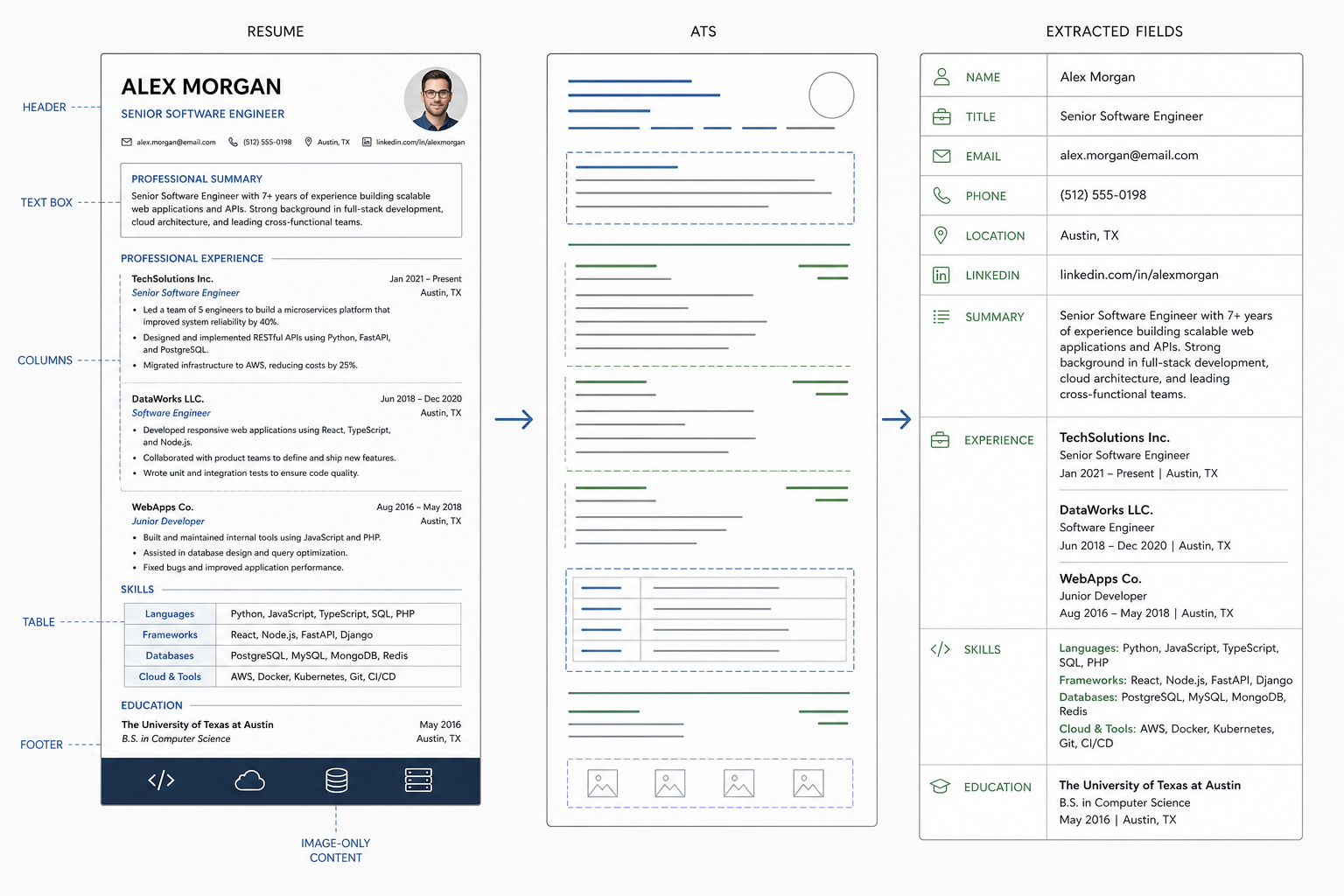
ATS reads live text and ordered sections, not decorative layout tricks.
That is why resume format is not a design preference. It is a readability decision. A resume that looks impressive but confuses the parser is weaker than one that looks plain and lands the right information in the right order. For job applications, especially when you submit to large employers using systems like Workday, Greenhouse, Lever, or Taleo, that difference can decide whether a human ever sees the file.
How to format a resume section by section
The safest way to format a resume is to build each section in a standard order and keep the text live. Start with contact information at the top, then move into summary, experience, skills, education, and optional certifications. Each block should be easy to identify without guesswork.
- Put your name, phone number, email, city, and relevant links in plain text at the top.
- Use a short summary only if it helps position you for the role you want.
- List work experience in reverse chronological order, with job title, employer, location, and dates on clear lines.
- Add a skills section that uses the language of the job description where it is accurate.
- Keep education and certifications simple and searchable.
A good example of the experience block is this:
Senior Product Analyst | Brightlane
Austin, TX | Mar 2023 to Present
- Built weekly reporting for retention and revenue trends.
- Improved dashboard accuracy by standardising source definitions.
That structure works because it is plain, consistent, and easy to index. The same rule applies to the skills section. Do not bury important skills inside a graphic or a two-column design. If you want a simple example layout, a single-column template is a better model than a visual-heavy one.
Tip: If a section title sounds clever, make it standard instead. “Experience” beats “My Story,” and “Skills” beats “What I Know.” ATS recognition matters more than personality in the heading line.
What are the 5 golden rules of resume writing?
The five golden rules are simple enough to use while editing, and strict enough to keep your file ATS-safe. First, keep the layout text-based. Second, use standard headings. Third, place keywords naturally. Fourth, stay reverse chronological unless you have a real reason not to. Fifth, proofread for consistency.
The rule that saves the most trouble is the one about standard headings, because ATS systems can miss creative labels even when the rest of the file is clean. A resume with inconsistent dates, mixed tense, or shifted spacing can also look like a parsing problem even when the content is strong. If you are using a resume template, test it line by line before you commit to it.
Here is the practical version:
- Keep the layout simple.
- Use headings ATS expects.
- Add role-relevant keywords naturally.
- Preserve reverse chronology.
- Check every date, title, and alignment detail.
These rules are not decorative advice. They are the difference between a file that reads cleanly and one that gets partially flattened by software.
What are the 3 C's of a resume?
The 3 C's of a resume are clarity, consistency, and concision. In formatting terms, that means the reader should immediately know what each section is, every date should follow the same pattern, and every line should earn its space.
Clarity starts with structure. A recruiter and an ATS should be able to find the same information without hunting. Consistency keeps the document stable, which helps both parsing and human review. Concision stops the page from turning into clutter, especially when you are trying to fit experience, skills, and education into one or two pages.
The 3 C's are also a good filter for deciding whether a layout is too clever. If a design choice makes the page harder to read, it fails all three. That is usually enough reason to remove it.
Resume format for freshers: what changes and what stays the same?
A resume format for freshers should stay ATS-friendly even when the candidate has little work experience. The structure does not change much: keep the same one-column, text-first approach, and use standard headings. What changes is the emphasis.
For entry-level candidates, education, internships, projects, coursework, and skills often carry more weight than formal job history. That is fine, as long as the content is still searchable and well ordered. A fresh graduate does not need a more decorative layout. They need a clearer one.
That is why a “fresher” template should still look like a resume, not a portfolio page. If you are building from zero, a closely matched resume for fresher example can help you see how to keep the same ATS-safe structure while shifting the content mix.
Microsoft Word, Adobe Acrobat, and resume templates: which tools help and which create risks?
Microsoft Word is usually the safest drafting tool for an ATS-friendly resume format because it preserves live text and standard structure well. Adobe Acrobat is useful at the end of the process when you want to inspect the PDF export. Resume templates can save time, but only if they stay simple enough for the parser to read correctly.
The easiest workflow is also the most reliable: draft in Word, export to PDF only after checking the layout, and open the final file one more time before sending it. That keeps the focus on structure instead of cosmetics.
Here is the practical trade-off:
| Tool | What it does well | What can go wrong |
|---|---|---|
| Microsoft Word | Clean drafting and easy edits | Over-designed templates can still break parsing |
| Adobe Acrobat | Final PDF review | It cannot rescue a bad structure |
| Resume template | Fast starting point | Columns, icons, and sidebars can confuse ATS |
| Free builders | Quick output | Some force design-heavy layouts |
A good builder or template tool should help you maintain structure, not hide it. If you want a practical filter for that decision, this guide on free resume builder worth using explains what to check before you trust the export. The best workflow is simple: draft in Word, export carefully, and open the final PDF to confirm that nothing shifted.
Common ATS formatting mistakes to avoid
The most common ATS mistakes are usually visual choices that break text extraction. Text boxes, tables, columns, icons, charts, headers, footers, and image-only content can all cause trouble. So can unusual fonts, inconsistent spacing, and section names that the software does not recognise.
Avoid these patterns:
- Multi-column layouts
- Decorative graphics
- Embedded logos or skill icons
- Paragraphs inside text boxes
- Headers and footers with key content
- File versions that distort when reopened
If you keep one rule in mind, make it this: if the content is not plain live text, ATS may not read it the way you expect. That is also why a simple resume format is often stronger than a stylised one. It protects the parts that matter most: titles, dates, skills, and results.
What is a good free resume builder?
A good free resume builder is one that produces a clean, editable, ATS-friendly resume format without forcing you into a heavy design. The key test is not how many templates it offers. It is whether you can keep the file one column, text-first, and fully searchable.
Look for these features:
- Standard section headings
- Live text in every field
- Easy export to PDF or DOCX
- One-column layouts by default
- No forced icons or graphics
That is why the best free builder is usually the one that gives you control, not the one that promises the flashiest result. If you want to compare options more carefully, this companion on resume builder basics shows how builders fit into a normal job-seeking workflow without changing the structure of the resume itself.
What is the best free resume builder?
The best free resume builder is the one that lets you control structure, spacing, and section order while preserving live text in the export. It should make a plain, readable file easy, not fight you into a design that looks good only on the screen.
The real test is output quality. Open the exported file and check whether the skills section, dates, and headings remain intact. If they do, the tool is useful. If the layout shifts, the builder is not helping your resume format, no matter how polished the preview looked.
For job seekers who want a quick shortcut, this is the rule: choose function first, styling second. That is what keeps an ATS-readable resume from turning into a formatting problem.


Create your Resume
Your resume is an extension of you. Make it truly yours.
Related Articles
Related guides & tools
Free AI Resume BuilderBuild a tailored, ATS-friendly resume from scratchFree Resume TemplatesChoose a professional layout for your roleATS Resume CheckerCheck your score, parsing and issues before you applyOnline CV MakerCreate a CV with guided sections and templatesOnline Resume EditorEdit an existing PDF without rebuilding its layoutHobbies for ResumeSkills for ResumeLinkedIn to ResumeResume Examples
Continue Reading
Check more recommended readings to get the job of your dreams.
careerBy Pika Resume Team | Aug 3, 2026
Resume Maker vs Resume Builder: Which Should Job Seekers Use?
By Pika Resume Team | Aug 3, 2026
careerBy Pika Resume Team | Aug 2, 2026
Free Resume Builder and Download vs Microsoft Word
By Pika Resume Team | Aug 2, 2026
careerBy Pika Resume Team | Jul 30, 2026
What Is the Best Resume Builder Website for 2026?
By Pika Resume Team | Jul 30, 2026
careerBy Pika Resume Team | Jul 27, 2026
How to Cancel Resume Builder Subscription Without Surprises
By Pika Resume Team | Jul 27, 2026
careerBy Pika Resume Team | Jul 26, 2026
How Much Is Resume Builder? Free vs Paid Explained
By Pika Resume Team | Jul 26, 2026
careerBy Pika Resume Team | Jul 20, 2026
Resume Builder App: What the Best One Lets You Do
By Pika Resume Team | Jul 20, 2026
careerBy Pika Resume Team | Jul 19, 2026
Free Resume Builder and Download: Compare the Best Options
By Pika Resume Team | Jul 19, 2026
careerBy Pika Resume Team | Jul 16, 2026
Free AI Resume Builder: What It Does Well and Fails At
By Pika Resume Team | Jul 16, 2026
careerBy Pika Resume Team | Jul 13, 2026
Resume format for ATS: a simple guide that works
By Pika Resume Team | Jul 13, 2026
careerBy Pika Resume Team | Jul 12, 2026
Canva Resume Builder vs ATS Reality Check
By Pika Resume Team | Jul 12, 2026
careerBy Pika Resume Team | Jul 9, 2026
Free resume builder: what makes one worth using
By Pika Resume Team | Jul 9, 2026
careerBy Pika Resume Team | Jul 6, 2026
Resume Builder: What It Actually Does for Job Seekers
By Pika Resume Team | Jul 6, 2026
resume tipsBy Pika Resume Team | Jun 20, 2026
The Resume Sections Most People Get Wrong (and How to Fix Each One)
By Pika Resume Team | Jun 20, 2026resume tipsBy Pika Resume Team | Jun 18, 2026
How to Edit a PDF Resume Without Wrecking the Formatting
By Pika Resume Team | Jun 18, 2026resume reviewBy Pika Resume Team | Jun 16, 2026
AI Resume Feedback vs a Human Expert Review: When Each Is Worth It
By Pika Resume Team | Jun 16, 2026atsBy Pika Resume Team | Jun 14, 2026
What an ATS Actually Does to Your Resume (and the 8 Things It Scores)
By Pika Resume Team | Jun 14, 2026resume tipsBy Pika Resume Team | Jun 12, 2026
How to Tailor Your Resume to a Job Description in 2026 (the 3-Pass Method)
By Pika Resume Team | Jun 12, 2026resumeBy Gargi Chaudhari | May 30, 2026
Resume vs Biodata vs CV: Which One Do You Actually Need?
By Gargi Chaudhari | May 30, 2026resume By Astha Narang | May 28, 2026
10 Software Engineer Resume Examples That Got Interviews (2026)
By Astha Narang | May 28, 2026resumeBy Gargi Chaudhari | May 26, 2026
How to Convert a LinkedIn Profile to a Resume or CV
By Gargi Chaudhari | May 26, 2026resumeBy Astha Narang | May 23, 2026
Best Resume Format for Indian IT Services Companies (TCS, Infosys, Wipro, Accenture)
By Astha Narang | May 23, 2026resumeBy Gargi Chaudhari | May 21, 2026
The Complete Guide to ATS Resume Screening in India (2026)
By Gargi Chaudhari | May 21, 2026resumeBy Astha Narang | May 19, 2026
Hobbies and Interests for Resume: Should You Include Them?
By Astha Narang | May 19, 2026resumeBy Gargi Chaudhari | May 14, 2026
How to Write a Resume Headline That Gets Recruiter Calls on Naukri
By Gargi Chaudhari | May 14, 2026interviewBy Astha Narang | May 8, 2026
Decoding Interviewer Psychology: What They Don't Tell You for Your Next Job
By Astha Narang | May 8, 2026resumeBy Gargi Chaudhari | May 7, 2026
Career Objective for Resume: 50+ Fresher Examples (2026)
By Gargi Chaudhari | May 7, 2026resumeBy Astha Narang | May 6, 2026
7 Dangerous ATS Myths Debunked: What Actually Gets You Hired in 2026
By Astha Narang | May 6, 2026resumeBy Astha Narang | May 4, 2026
Master Your Resume: The Ultimate Guide to Listing Computer Skills
By Astha Narang | May 4, 2026resumeBy Astha Narang | Apr 29, 2026
4 Sales Resume Examples for SDR, Account Executive & Manager (2026)
By Astha Narang | Apr 29, 2026resumeBy Astha Narang | Apr 29, 2026
4 Data Analyst Resume Examples for 2026 (Entry-Level to Senior)
By Astha Narang | Apr 29, 2026resumeBy Astha Narang | Apr 24, 2026
Resume Tips for 2026: The Ultimate Guide to Landing Interviews
By Astha Narang | Apr 24, 2026resumeBy Astha Narang | Apr 22, 2026
Bad Resume vs. Good Resume: A Side-by-Side Comparison for Job Seekers
By Astha Narang | Apr 22, 2026resumeBy Astha Narang | Apr 20, 2026
How to Add LinkedIn to Your Resume the Right Way in 2026
By Astha Narang | Apr 20, 2026resumeBy Astha Narang | Apr 17, 2026
7 Common Resume Mistakes to Avoid in 2026 (and How to Fix Them)
By Astha Narang | Apr 17, 2026resumeBy Pika Resume Team | Apr 15, 2026
Master Your LinkedIn-to-Resume Link: A 2026 Guide for Top Candidates
By Pika Resume Team | Apr 15, 2026resumeBy Astha Narang | Apr 13, 2026
How to Write a Winning Resume Summary That Grabs Recruiter Attention
By Astha Narang | Apr 13, 2026careerBy Astha Narang | Apr 11, 2026
Owning Your Career Break: How to Frame a Gap Year on Your Resume in 2026
By Astha Narang | Apr 11, 2026resumeBy Astha Narang | Apr 8, 2026
The Complete 2026 Resume Guide: Crafting a Job-Winning Document
By Astha Narang | Apr 8, 2026resumeBy Astha Narang | Apr 4, 2026
Beat the ATS: Optimize Your Resume for Applicant Tracking Systems in 2026
By Astha Narang | Apr 4, 2026resumeBy Astha Narang | Mar 30, 2026
Expert Resume Review: Is It Worth the Investment for Your Career?
By Astha Narang | Mar 30, 2026resumeBy Astha Narang | Mar 25, 2026
Master the 30-Second Resume Scan: Expert & Recruiter Insights
By Astha Narang | Mar 25, 2026resumeBy Astha Narang | Mar 24, 2026
How to Explain Employment Gaps on Your Resume & Ace Interviews
By Astha Narang | Mar 24, 2026resumeBy Astha Narang | Mar 20, 2026
Master Resume Keywords: Your Guide to ATS Success
By Astha Narang | Mar 20, 2026careerBy Astha Narang | Mar 18, 2026
How to Stand Out in Interviews While Still Being Authentic
By Astha Narang | Mar 18, 2026careerBy Astha Narang | Mar 14, 2026
Why Sending the Same Resume to Every Job is Costing You Interviews
By Astha Narang | Mar 14, 2026resumeBy Astha Narang | Mar 12, 2026
The Dynamic Duo: Why AI + Human Expertise is the 2026 Career Cheat Code
By Astha Narang | Mar 12, 2026careerBy Astha Narang | Mar 9, 2026
Get Your Resume Roasted Using PIKA AI
By Astha Narang | Mar 9, 2026jobBy Astha Narang | Mar 7, 2026
How to Show a Promotion on Your Resume? (And Why Most People Get It Wrong)
By Astha Narang | Mar 7, 2026careerBy Astha Narang | Mar 6, 2026
Should You Put Your Address on Your Resume in 2026?
By Astha Narang | Mar 6, 2026careerBy Astha Narang | Mar 3, 2026
Is It Illegal to Lie on a Resume? What Actually Happens in 2026
By Astha Narang | Mar 3, 2026jobBy Pika Resume Team | Feb 5, 2026
How to Optimize Your Resume for Remote Job Applications
By Pika Resume Team | Feb 5, 2026interviewBy Pika Resume Team | Feb 1, 2026
How to Write an ATS-Friendly Resume in 2026
By Pika Resume Team | Feb 1, 2026cover-letterBy Pika Resume Team | Jan 25, 2026
Top 7 Cover Letter Mistakes That Cost You the Interview
By Pika Resume Team | Jan 25, 2026resumeBy Pika Resume Team | Jan 18, 2026
AI Resume Builders: A Complete Guide for Job Seekers in 2026
By Pika Resume Team | Jan 18, 2026jobBy Pika Resume Team | Jan 10, 2026
Resume Tips for Career Changers: Making a Smooth Transition
By Pika Resume Team | Jan 10, 2026careerBy Pika Resume Team | Jan 3, 2026
The Power of Keywords in Your Resume: An SEO Approach to Job Applications
By Pika Resume Team | Jan 3, 2026